
Crops
Seed
Create a new yml file for your crop.
This is a simple seed item.
info:
  namespace: my_crops
items:
  red_crop_seed:
    name: Crop Seed
    graphics:
      texture: item/red_crop_seed
Put the texture into ItemsAdder/contents/my_crops/textures/item/red_crop_seed.png.
Model
ItemsAdder can auto generate the models for you. In this example I want to create a model based on the vanilla crop model, but with custom texture.
crops:
  red_crop:
    models_by_textures:
      parent: minecraft:block/crop
      textures_prefix: block/red_crop_stage_
      model_texture_key: crop
    max_age: 7
    seed: red_crop_seed
Set seed to the seed item id (red_crop_seed).
Set parent to minecraft:block/crop in order to use it as base model.
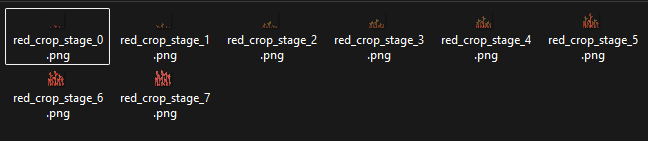
Set textures_prefix to block/red_crop_stage_ to find any texture that starts by that text, so it automatically gets them based on the max_age (7).
model_texture_key is used to replace the texture key inside the json model, in this example crop.
More info about model_texture_key
Here you can see a preview of the original parent model, with the #crop text that will be replaced by the model_texture_key.
{
  "ambientocclusion": false,
  "textures": {
    "particle": "#crop"
  }
  // ... remaining model properties ...
}
Put all the textures inside ItemsAdder/contents/my_crops/textures/block/.
Hitbox
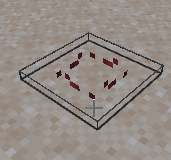
You can automatically increase the hitbox based on the crop age by using the property hitbox_auto_height_step.
hitbox_auto_height_step: default value is 0.
This will make the crop hitbox grow with the model proportionally.
crops:
  red_crop:
    models_by_textures:
      parent: minecraft:block/crop
      textures_prefix: block/red_crop_stage_
      model_texture_key: crop
    max_age: 7
    hitbox_auto_height_step: 0.1
You can also decide a starting hitbox size.
widthby default is1.0lengthby default is1.0heightby default is1.0
    default_hitbox:
      width: 1.0
      length: 1.0
      height: 0.1
If you want more customization you can set per-age hitbox sizes.
All options are optional, you can override a single one or all.
  hitboxes:
    0:
      height: 0.5
      width: 0.5
      length: 0.1
    1:
      height: 0.8
      width: 0.8
      length: 0.2
Growing settings
avg_seconds_per_stage
It uses the value set in config.yml by default.
Average time in seconds for a plant to grow one stage under optimal conditions.
Used to calculate growth probability at each check (p = checkInterval / avgSecondsPerStage).
Lower values make crops grow faster, higher values make them grow slower.
min_light
Minimum light level above the crop for growth to occur.
Sounds
Sounds settings.
place_soundbreak_soundinteract_sound
multipliers
Used to determine how fast/slow the crop grows on some conditions.
bonemeal: When interacted with Bone Mealmax_moisture: When moisture is at max level (7). Value of0.5means plants grow 2x faster at max moisture.rain: When it rainsthunderstorm: When there is a thunderstormsnow: When it snows
crops:
  red_crop:
    models_by_textures:
      parent: minecraft:block/crop
      textures_prefix: block/red_crop_stage_
      model_texture_key: crop
    max_age: 7
    hitbox_auto_height_step: 0.1
    avg_seconds_per_stage: 240
    min_light: 9
    place_sound: minecraft:item.crop.plant
    break_sound: minecraft:block.crop.break
    multipliers:
      bonemeal: 0.2
      max_moisture: 0.5
      rain: 0.7
      thunderstorm: -0.5
      snow: -0.7
Loots
drop_seed_if_immature
(default: true) This property makes 1 crop seed drop when player breaks the crop that has not reached the max stage and didn't already drop anything (to avoid duplication).
loots
This is the property where you can list all the loots for this crop.
trigger
By default: BREAK.
BREAK: block broken normallyINTERACT: user clicked/used the cropTRAMPLE: stepped onWATER: removed by flowing waterLAVA: removed by lavaFARMLAND_DRY: soil turned to dirt when no longer hydrated
triggers
Alternative to trigger, you can set multiple triggers.
Example
crops:
  red_crop:
    # ..... previous properties
    loots:
      red_crop_1:
        triggers:
         - INTERACT
         - BREAK
decrease_age
This is used to make the crop lose age instead of being broken.
age
Age when the loot will be satisfied.
age_range
Alternative to age which allows for further customization of the age range when the loot should be dropped.
crops:
  red_crop:
    # ..... previous properties
    loots:
      red_crop_1:
        ## ... other properties
        age_range:
          min: 1
          max: 3
biomes
List of biomes where the loot should be dropped.
worlds
List of worlds where the loot should be dropped.
tools
List of tools that can trigger the loot.
Supports wildcard * and use hand to allow hand to trigger the loot.
By default hand is used.
stop_on_first_success
Is used to stop other loots to drop whenever a loot already was satisfied and was just dropped.
commands
List of commands to be triggered.
Each command has a set of properties:
command: command to be executedas_console(default:true): if executed as consolesilent(default:false): if silent or show a message in console
Example
      red_crop_1:
        trigger: INTERACT
        decrease_age: 3
        age: 2
        commands:
          my_group_1:
            chance: 100
            my_command_1:
              command: tell {player} hello!
exp_drop
Drops some experience.
        exp_drop:
          min_amount: 1
          max_amount: 1
          chance: 100
exp_drops
Alternative to exp_drop that allows more than 1 entry to be set.
Example
        exp_drops:
          exp1:
            min_amount: 1
            max_amount: 1
            chance: 100
item_drop
Drops an item.
        item_drop:
          item: DIAMOND
          min_amount: 1
          max_amount: 1
          chance: 100
          ignore_fortune: false
item_drops
Alternative to item_drop to drop more than 1 item.
        item_drops:
          change_me:
            item: DIAMOND
            min_amount: 1
            max_amount: 1
            chance: 100
            ignore_fortune: false
bottom_block
Allow only this particular block to be a valid placement base for the crop. Usually set to farmland.
Done!
Your custom crop is ready.
Just generate your resourcepack using /iazip.
Performance optimization
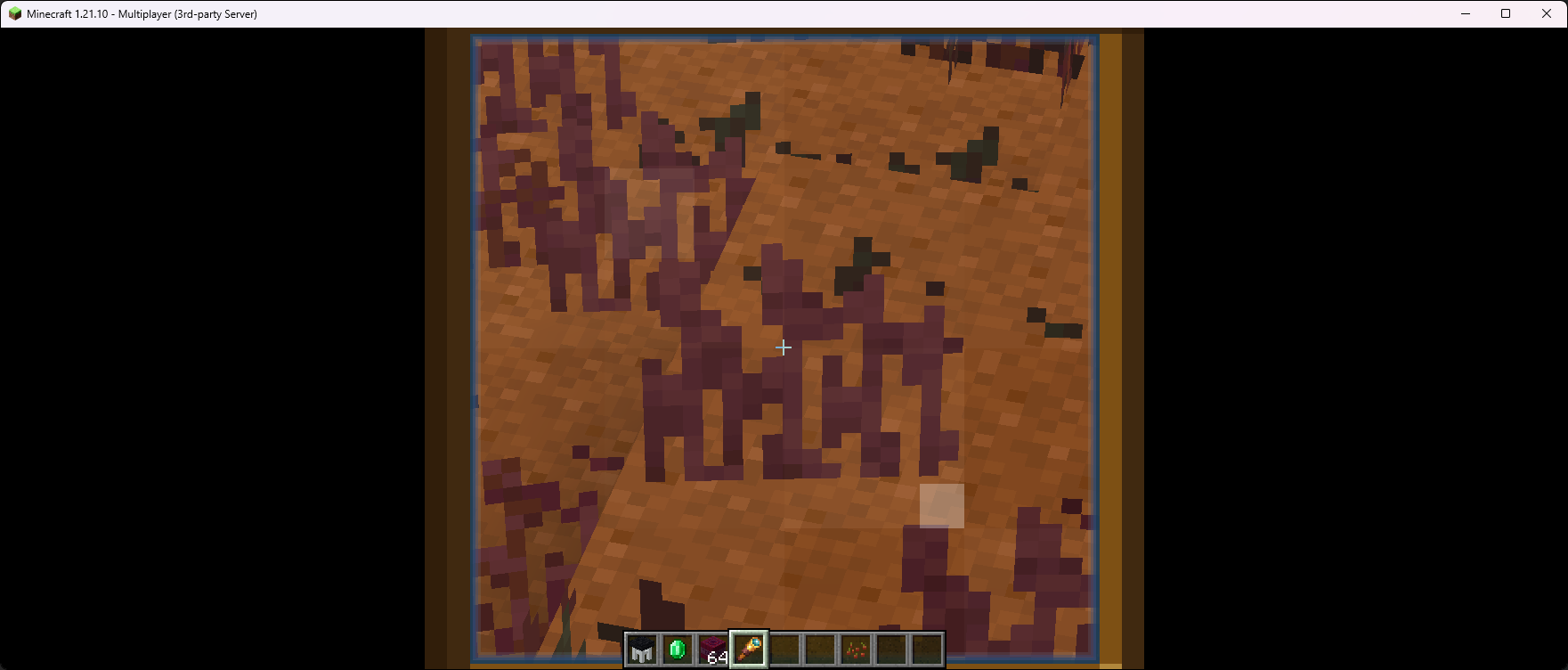
The plugin uses a method to optimize the crops rendering, called billboard.
A billboard is basically a simpler model used to show crops that are far away.
By default the plugin already creates billboard for your models, but if you want to use different models you can do that with some properties.
By default the billboard model is just a flat surface, which is the same logic used by many videogames.
Auto generate billboard based on custom parent and custom textures
crops:
  red_crop:
    models_by_textures:
      # Let it auto generate the models
      parent: minecraft:block/crop
      textures_prefix: block/red_crop_stage_
      model_texture_key: crop
      billboard_parent: minecraft:block/crop_billboard
      billboard_textures_prefix: block/red_crop_stage_
Auto generate billboard based on custom models
crops:
  red_crop:
    models_by_textures:
      # Let it auto generate the models
      parent: minecraft:block/crop
      textures_prefix: block/red_crop_stage_
      model_texture_key: crop
      billboard_textures_prefix: block/red_crop_stage_
Alternative crops models (cross)
crops:
  blue_berry_bush:
    models_by_textures:
      parent: minecraft:block/cross
      textures_prefix: block/blue_berry_bush_stage_
      model_texture_key: cross
You can use cross as an alternative model, similar to vanilla sweet_berries.
Custom crops models
You can use some custom models for your crops.
Instead of using models_by_textures you have to use models_by_items.
You have to create a single model for each one of your crops stages + billboards.
Items creation
You have to create a single model for each one of your crops stages + billboards.
info:
  namespace: my_crops
items:
  blue_crop_stage_template:
    template: true
    graphics:
      parent: minecraft:block/crop
  blue_crop_stage_0:
    variant_of: blue_crop_stage_template
    graphics:
      textures:
        crop: block/blue_crop_stage_0
  blue_crop_stage_1:
    variant_of: blue_crop_stage_template
    graphics:
      textures:
        crop: block/blue_crop_stage_1
  blue_crop_stage_2:
    variant_of: blue_crop_stage_template
    graphics:
      textures:
        crop: block/blue_crop_stage_2
  blue_crop_stage_3:
    variant_of: blue_crop_stage_template
    graphics:
      textures:
        crop: block/blue_crop_stage_3
  blue_crop_stage_4:
    variant_of: blue_crop_stage_template
    graphics:
      textures:
        crop: block/blue_crop_stage_4
  blue_crop_stage_5:
    variant_of: blue_crop_stage_template
    graphics:
      textures:
        crop: block/blue_crop_stage_5
  blue_crop_stage_6:
    variant_of: blue_crop_stage_template
    graphics:
      textures:
        crop: block/blue_crop_stage_6
  blue_crop_stage_7:
    variant_of: blue_crop_stage_template
    graphics:
      textures:
        crop: block/blue_crop_stage_7

  # Billboard model is used when far from crops, to get higher FPS
  blue_crop_stage_template_billboard:
    template: true
    graphics:
      parent: minecraft:block/crop_billboard
  blue_crop_stage_0_billboard:
    variant_of: blue_crop_stage_template_billboard
    graphics:
      textures:
        crop: block/blue_crop_stage_0
  blue_crop_stage_1_billboard:
    variant_of: blue_crop_stage_template_billboard
    graphics:
      textures:
        crop: block/blue_crop_stage_1
  blue_crop_stage_2_billboard:
    variant_of: blue_crop_stage_template_billboard
    graphics:
      textures:
        crop: block/blue_crop_stage_2
  blue_crop_stage_3_billboard:
    variant_of: blue_crop_stage_template_billboard
    graphics:
      textures:
        crop: block/blue_crop_stage_3
  blue_crop_stage_4_billboard:
    variant_of: blue_crop_stage_template_billboard
    graphics:
      textures:
        crop: block/blue_crop_stage_4
  blue_crop_stage_5_billboard:
    variant_of: blue_crop_stage_template_billboard
    graphics:
      textures:
        crop: block/blue_crop_stage_5
  blue_crop_stage_6_billboard:
    variant_of: blue_crop_stage_template_billboard
    graphics:
      textures:
        crop: block/blue_crop_stage_6
  blue_crop_stage_7_billboard:
    variant_of: blue_crop_stage_template_billboard
    graphics:
      textures:
        crop: block/blue_crop_stage_7
blue_crop_stage_: is the prefix that will be used to find the items used for the stages and for the billboard.
crops:
  blue_crop:
    models_by_items:
      items_id_prefix: blue_crop_stage_
Example crops pack
GuideSimple method
info:
  namespace: iasurvival
items:
  tomato_seeds:
    enabled: true
    display_name: display-name-tomato_seeds
    permission: iasurvival.crops.tomato_seeds
    resource:
      material: WHEAT_SEEDS
      generate: true
      textures:
        - item/crops/tomato_seeds
    specific_properties:
      seed:
        crop_block: SWEET_BERRY_BUSH
        results:
          result_1:
            item: iasurvival:tomato
            min_amount: 1
            max_amount: 2
            chance: 100
  garlic_seeds:
    enabled: true
    display_name: display-name-garlic_seeds
    permission: iasurvival.crops.garlic_seeds
    resource:
      material: WHEAT_SEEDS
      generate: true
      textures:
        - item/crops/garlic_seeds
    specific_properties:
      seed:
        crop_block: CARROTS
        results:
          result_1:
            item: iasurvival:garlic
            min_amount: 1
            max_amount: 2
            chance: 100
  chili_pepper_seeds:
    enabled: true
    display_name: display-name-chili_pepper_seeds
    permission: iasurvival.crops.chili_pepper_seeds
    resource:
      material: WHEAT_SEEDS
      generate: true
      textures:
        - item/crops/chili_pepper_seeds
    specific_properties:
      seed:
        crop_block: BEETROOTS
        results:
          result_1:
            item: iasurvival:chili_pepper
            min_amount: 1
            max_amount: 2
            chance: 100
  rice_seeds:
    enabled: true
    display_name: display-name-rice_seeds
    permission: iasurvival.crops.rice_seeds
    resource:
      material: WHEAT_SEEDS
      generate: true
      textures:
        - item/crops/rice_seeds
    specific_properties:
      seed:
        crop_block: WHEAT
        results:
          result_1:
            item: iasurvival:rice
            min_amount: 1
            max_amount: 2
            chance: 100