
The bow animates as you pull it, this allows you to have a single texture/model for each of these states.
To use the status textures, you need to add suffixes to your model filename or texture.
If you plan to use textures (png) you had to set generate: true.
If you plan to use models (json) you have to set generate: false, as you already have the models.
Suffixes for items
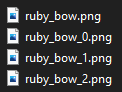
BOW_0- First pulling state._1- Second pulling state._2- Third pulling state.
FISHING_ROD_cast- Shows a fishing rod when it is cast.
SHIELD_blocking- Shows a shield model when you are blocking with it.
BUNDLE_filled- Displays a bundle when it is filled.
Adding item states using suffixes (bow)
Firstly you need to create three pulling states for our bow.

Save them, drop to the directory where is your original bow texture and add suffixes to your textures like this:
I put them into contents/myitems/textures/item/ folder of my resourcepack.
items:
  ruby_bow:
    name: Example Ruby Bow
    material: BOW
    graphics:
      textures:
        normal: item/bows/ruby_bow
        pulling_0: item/bows/ruby_bow_0
        pulling_1: item/bows/ruby_bow_1
        pulling_2: item/bows/ruby_bow_2
items:
  ruby_bow:
    display_name: Example Ruby Bow
    resource:
      material: BOW
      generate: true
      textures:
        - item/bows/ruby_bow
Done
You have working bow with item states.