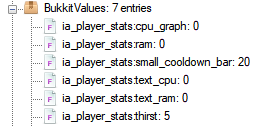
What are player stats?
They custom attributes added by ItemsAdder, you can add and read them using a special command: /iaplayerstat
You can then use PlaceholderAPI to show them anywhere or bind them to a HUD.
I did that to create thirst and mana. Check my default configs for examples.
Example:
/iaplayerstat write LoneDev thirst 6/iaplayerstat read LoneDev thirst float
Saving player stats
Custom NBT file
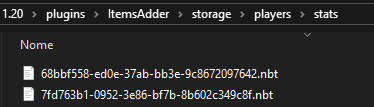
Saving them into a custom NBT file handled by ItemsAdder which can be later deleted easily.
This file is saved into plugins\ItemsAdder\storage\players\stats\ folder.
player_stats:
  save_type: CUSTOM_NBT
player.dat file
Saving them into the vanilla player.dat file.
This is useful if you want to sync your server and you already sync the player dat files.
player_stats:
  save_type: PLAYER_DAT