Download here
How to add compatibility?
- add all your mobs models and configurations inside the ModelEngine plugin folder (read the ModelEngine tutorials for more info)
- open
config.ymlof ItemsAdder and set this:
    merge_other_plugins_resourcepacks_folders:
      - "ModelEngine/resource pack"
- run
/meg reloadto generate the ModelEngine resourcepack. /iazip(and follow the hosting tutorial if needed).
Differences between ItemsAdder and ModelEngine
ModelEngine vs ItemsAdderNoSuchFileException issue
[ItemsAdder] Plugin ItemsAdder v4.0.15 generated an exception while executing task 9132
java.io.UncheckedIOException: java.nio.file.NoSuchFileException: /home/container/plugins/ModelEngine/resource pack/assets/minecraft
        at org.apache.commons.io.function.Uncheck.wrap(Uncheck.java:339) ~[commons-io-2.17.0.jar:2.17.0]
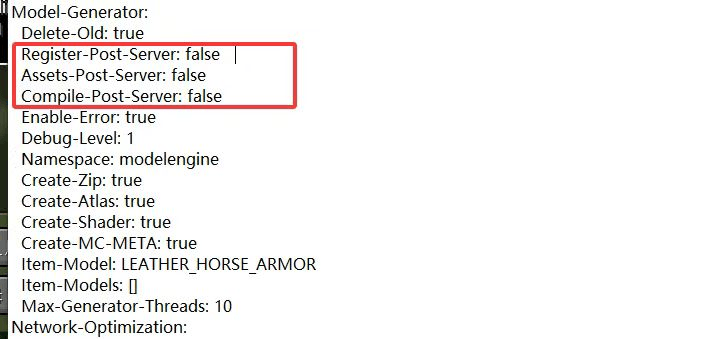
Open the config.yml file of ModelEngine and set the highlighted options to false.
This forces ModelEngine to load its resources during the early stages of server startup, rather than waiting until the server has fully initialized.
The root cause lies in plugin load order: ItemsAdder attempts to access ModelEngine’s model files before ModelEngine has finished loading its resources, so it cannot access them.