
The main tutorial uses the modern graphics configuration for Minecraft 1.21.4+ clients. The expandable section below preserves the legacy method for ItemsAdder 4.0.17 and older.
Tutorial for ItemsAdder 4.0.17 and older
Configuration file
For example I created a file which will contain all my custom blocks.
I created it in the folder: contents/myitems/configs/
I start creating a simple block called red_block in the file blocks.yml.
info:
  namespace: myitems
items:
  red_block:
    display_name: Red Block
    permission: red_block
    resource:
      material: PAPER
Creating the textures files
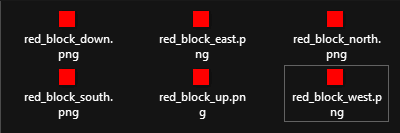
To do that you have to put the .png textures file inside the correct folder.
In this case your namespace is myitems so you have to put them in this folder:contents/myitems/textures/block/
Applying the textures files to your item
Now open blocks.yml file again and add the resource part as I did.
As you can see I set generate: true and I set the textures for the item.
This tells the plugin to generate the 3D model automatically using your texture.
info:
  namespace: myitems
items:
  red_block:
    display_name: Red Block
    permission: red_block
    resource:
      generate: true
      material: PAPER
Using different texture for each face
info:
  namespace: myitems
items:
  red_block:
    display_name: Red Block
    permission: red_block
    resource:
      generate: true
      material: PAPER
      textures:
        - block/red_block_down.png
        - block/red_block_east.png
        - block/red_block_north.png
        - block/red_block_south.png
        - block/red_block_up.png
        - block/red_block_west.png
Using the same texture for each face
info:
  namespace: myitems
items:
  red_block:
    display_name: Red Block
    permission: red_block
    resource:
      generate: true
      material: PAPER
      texture: block/red_block.png
Adding the block placing functionality
You have to add the behaviours attribute.
info:
  namespace: myitems
items:
  red_block:
    display_name: Red Block
    permission: red_block
    resource:
      generate: true
      material: PAPER
      texture: block/red_block.png
    behaviours:
      block:
        placed_model:
          type: REAL_NOTE
          break_particles: ITEM
Getting the block ingame
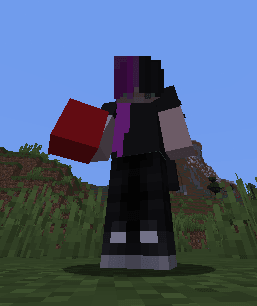
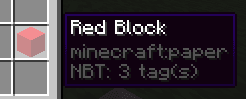
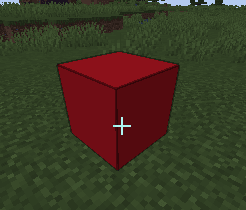
Run /iaget myitems:red_block to get the item.
Block loot
info:
  namespace: myitems
items:
  red_block:
    display_name: Red Block
    permission: red_block
    resource:
      generate: true
      material: PAPER
      texture: block/red_block.png
    behaviours:
      block:
        drop_when_mined: false # IMPORTANT! To avoid duplication
        placed_model:
          type: REAL_NOTE
          break_particles: ITEM


loots: # Here the custom loots list
  blocks:
    ruby_ore: # Here your custom block loot
      type: myitems:red_block
      biomes:
        - PLAINS
        - SUNFLOWER_PLAINS
        - MOUNTAINS
      items:
        drop1: # Here the dropped item
          item: DIAMOND
          min_amount: 1
          max_amount: 2
          chance: 100 # Percentage
Configuration file
For example I created a file which will contain all my custom blocks.
I created it in the folder: contents/myitems/configs/
I start creating a simple block called red_block in the file blocks.yml.
info:
  namespace: myitems
items:
  red_block:
    name: Red Block
    permission_suffix: red_block
    graphics:
      texture: block/red_block.png
Creating the textures files
To do that you have to put the .png textures file inside the correct folder.
In this case your namespace is myitems so you have to put them in this folder:contents/myitems/textures/block/
Using different texture for each face
info:
  namespace: myitems
items:
  red_block:
    name: Red Block
    permission_suffix: red_block
    graphics:
      textures:
        down: block/red_block_down.png
        east: block/red_block_east.png
        north: block/red_block_north.png
        south: block/red_block_south.png
        up: block/red_block_up.png
        west: block/red_block_west.png
Using the same texture for each face
info:
  namespace: myitems
items:
  red_block:
    name: Red Block
    permission_suffix: red_block
    graphics:
      texture: block/red_block.png
Adding the block placing functionality
You have to add the behaviours attribute.
info:
  namespace: myitems
items:
  red_block:
    name: Red Block
    permission_suffix: red_block
    graphics:
      texture: block/red_block.png
    behaviours:
      block:
        placed_model:
          type: REAL_NOTE
Getting the block ingame
Run /iaget myitems:red_block to get the item.
Download the complete example
Block loot
info:
  namespace: myitems
items:
  red_block:
    name: Red Block
    permission_suffix: red_block
    graphics:
      texture: block/red_block.png
    behaviours:
      block:
        drop_when_mined: false # IMPORTANT! To avoid duplication
        placed_model:
          type: REAL_NOTE

loots: # Here the custom loots list
  blocks:
    ruby_ore: # Here your custom block loot
      type: myitems:red_block
      biomes:
        - PLAINS
        - SUNFLOWER_PLAINS
        - MOUNTAINS
      items:
        drop1: # Here the dropped item
          item: DIAMOND
          min_amount: 1
          max_amount: 2
          chance: 100 # Percentage