
Wear texture configuration
equipments:
  my_armor_1:
    type: armor
    layer_1: armor/my_armor_1/layer_1
    layer_2: armor/my_armor_1/layer_2
The equipment is a property which contains the information how to show the armor in-game on the player body.
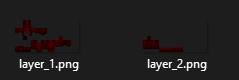
Create the layers files inside the folder: contents/my_armor_tutorial/textures/armor/my_armor_1 .
Item configuration
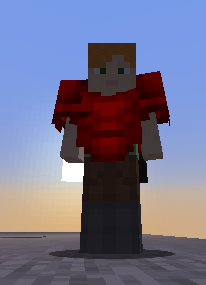
In this example I will show how to create a chestplate, the same can be done to create other armor pieces.
  my_armor_1_chestplate:
    name: My Armor 1 Chestplate
    material: IRON_CHESTPLATE
    graphics:
      texture: item/my_armor_1_chestplate
    durability:
      max_durability: 165
    equipment:
      id: my_armor_tutorial:my_armor_1
      slot_attribute_modifiers:
        armor: 1
As you can see I set the material to IRON_CHESTPLATE.
I also set the equipment.id property to my_armor_tutorial:my_armor_1.
This loads our previously created equipment settings.
Inventory item textures
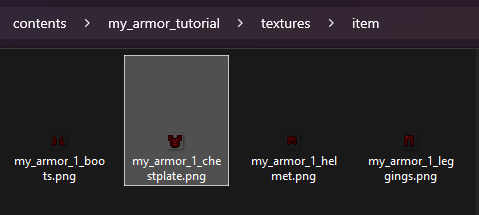
Create the item texture and put it inside the folder:contents/my_armor_tutorial/textures/item.
Extra: Custom 3D helmet
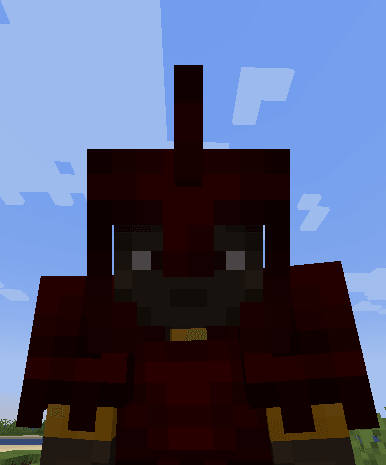
Currently only helmets support 3D models due to a Minecraft limitation I cannot fix.
  my_armor_1_helmet_3d:
    name: My Armor 1 Helmet 3D
    material: IRON_HELMET
    graphics:
      model: armor/my_armor_1_helmet_3d
    durability:
      max_durability: 165
    equipment:
      slot_attribute_modifiers:
        armor: 2.5
Full configuration from the previous example
Click here to read the configuration file
info:
  namespace: my_armor_tutorial
equipments:
  my_armor_1:
    type: armor
    layer_1: armor/my_armor_1/layer_1
    layer_2: armor/my_armor_1/layer_2
items:
  my_armor_1_helmet:
    name: My Armor 1 Helmet
    material: IRON_HELMET
    graphics:
      texture: item/my_armor_1_helmet
    durability:
      max_durability: 165
    equipment:
      id: my_armor_tutorial:my_armor_1
      slot_attribute_modifiers:
        armor: 2.5
  my_armor_1_chestplate:
    name: My Armor 1 Chestplate
    material: IRON_CHESTPLATE
    graphics:
      texture: item/my_armor_1_chestplate
    durability:
      max_durability: 165
    equipment:
      id: my_armor_tutorial:my_armor_1
      slot_attribute_modifiers:
        armor: 1
  my_armor_1_leggings:
    name: My Armor 1 Leggings
    material: IRON_LEGGINGS
    graphics:
      texture: item/my_armor_1_leggings
    durability:
      max_durability: 165
    equipment:
      id: my_armor_tutorial:my_armor_1
      slot_attribute_modifiers:
        armor: 2.5
  my_armor_1_boots:
    name: My Armor 1 Boots
    material: IRON_BOOTS
    graphics:
      texture: item/my_armor_1_boots
    durability:
      max_durability: 165
    equipment:
      id: my_armor_tutorial:my_armor_1
      slot_attribute_modifiers:
        armor: 2.5
Animated/emissive armors
The current custom armors method doesn't support animated and emissive textures.
To create animated or/and emissive textures you have to use the Old Textured method (uses shaders).
HD armor textures
I do not advice to use HD textures since this is a blocky game, but can create HD high resolution, but make sure they have the same proportions of the original vanilla armors layers textures.
Size must be a power of 2, for example: 64x32, 128x64, 256x128, 512x256.
Converting old armors to the new equipment tag
This option will convert the armors completely to use the new equipment tag. Note that old clients won't see the armor anymore (older than 1.21.2).
advanced:
    completely_convert_to_new_equipment_tag:
      enabled: true
      new_armor_material: IRON
Custom wear texture
Creating the armor renderer
info:
  namespace: my_items
armors_rendering:
  my_armor:
    color: "#d60000"
    layer_1: armor/my_armor/layer_1
    layer_2: armor/my_armor/layer_2
    use_color: false
use_color: falsedisables the recoloring of the armor using the specifiedcolor: "#d60000". It would have colored the armor texture if were set totrue.\
In some cases you may want to recolor the armor using the specified color, so you will have to set it to true.
This option will also make the item (in inventory) not colored automatically anymore.
coloris the color attribute of this armor.\
It acts like an unique identifier for the armor (and will tint the armor if use_color is true). Use this website to get a valid color: https://minecraftcommand.science/armor-color.
Note: ItemsAdder will automatically select a nearest unused color if the selected one is already used by another custom armor.
Now I create the two PNG files inside the contents/my_items/textures/armor/my_armor/ folder.
Creating an armor piece
Let's create a chestplate.
To create other pieces you just have to repeat the following method and change the slot.
  my_armor_chest:
    display_name: my_armor chestplate
    permission: my_armor
    resource:
      generate: true
      textures:
      - item/my_armor/chestplate
    durability:
      max_custom_durability: 400
    specific_properties:
      armor:
        slot: chest
        custom_armor: my_armor
    attribute_modifiers:
      chest:
        armor: 7
        armorToughness: 1
The custom_armor property is important, it makes the plugin apply the previous armors_renderer setting to this armor piece.
In this case I didn't specify any color in the specific_properties field of the armor piece because it's automatically applied by the custom_armor property, inherited from the armors_renderer.
Now I create the item texture and I put it inside the folder:contents/my_items/textures/item/my_armor/.
In this example I created also a new folder called my_armor to better organize the resourcepack since you will have 1 texture for each armor piece, and having them in the same textures folder might cause confusion.
contents/my_items/textures/item/my_armor/chestplate.png
Animated textures
You can also create animated armors!
To create an animated armor you have to create an image with all the animation frames.
Each frame must be under the previous. This is an example this is a 3 frames animation:


Now let's edit the rendering properties to support the animation.
info:
  namespace: my_items
armors_rendering:
  my_armor:
    color: "#d60000"
    layer_1: armor/my_armor/layer_1
    layer_2: armor/my_armor/layer_2
    use_color: false
    animation:
      interpolation: true
In this case I set interpolation: true because I want the animation to be smooth.
Default speed is 24, but you can customize it until you find the right speed value:
    animation:
      speed: 30
      interpolation: true
Emissive textures (glowing in the dark)
You can also create emissive textures which glow in the dark. (You can make both animated and emissive textures at the same time!)
info:
  namespace: my_items
armors_rendering:
  my_armor:
    color: "#d60000"
    layer_1: armor/my_armor/layer_1
    layer_2: armor/my_armor/layer_2
    emissive_1: armor/my_armor/emissive_1
    emissive_2: armor/my_armor/emissive_2
    use_color: false
In this case I want to make the previous animation emissive, I want it to glow in the dark.
You have to make 2 textures in order to make the textures glow.
The transparent part won't glow while the colored part will glow.
You basically just have to copy and paste your texture and erase the parts you don't want to glow.
Extra: Custom 3D helmet
This is an example on how to create a custom helmet that has a 3D model and not just a texture.
info:
  namespace: my_items
items:
  test_3d_helmet:
    display_name: Test 3D Helmet
    resource:
      generate: false
      model_path: item/test_3d_helmet
      material: PAPER
    durability:
      max_durability: 1562
    behaviours:
      hat: true
Full configuration from the previous example
Click here to read the configuration file
info:
  namespace: myitems
armors_rendering:
  myarmor:
    color: "#d60000"
    layer_1: armor/myarmor/layer_1
    layer_2: armor/myarmor/layer_2
items:
  myarmor_helmet:
    display_name: myarmor helmet
    permission: myarmor
    resource:
      generate: true
      textures:
      - item/myarmor/helmet
    durability:
      max_custom_durability: 275
    specific_properties:
      armor:
        slot: head
        custom_armor: myarmor
    attribute_modifiers:
      head:
        armor: 9
        armorToughness: 1
  myarmor_chestplate:
    display_name: myarmor chestplate
    permission: myarmor
    resource:
      generate: true
      textures:
      - item/myarmor/chestplate
    durability:
      max_custom_durability: 400
    specific_properties:
      armor:
        slot: chest
        custom_armor: myarmor
    attribute_modifiers:
      chest:
        armor: 7
        armorToughness: 1
  myarmor_leggings:
    display_name: myarmor leggings
    permission: myarmor
    resource:
      generate: true
      textures:
      - item/myarmor/leggings
    durability:
      max_custom_durability: 375
    specific_properties:
      armor:
        slot: legs
        custom_armor: myarmor
    attribute_modifiers:
      legs:
        armor: 5
        armorToughness: 1
  myarmor_boots:
    display_name: myarmor boots
    permission: myarmor
    resource:
      generate: true
      textures:
      - item/myarmor/boots
    durability:
      max_custom_durability: 325
    specific_properties:
      armor:
        slot: FEET
        custom_armor: myarmor
    attribute_modifiers:
      feet:
        armor: 3
        armorToughness: 1
Extract the zip into the contents folder of ItemsAdder
FAQ

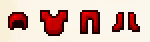
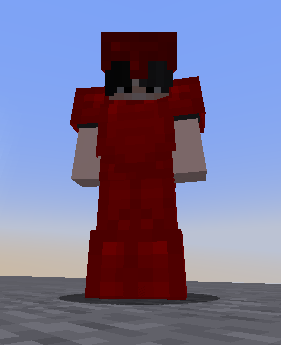
This is a simple armor which is created automatically without textures, ItemsAdder will generate it from the color you decided and will be similar to iron/diamond armors but with different color.
Creating an armor piece
Let's create a chestplate.
To create other pieces you just have to repeat the following method and change the slot.
  my_armor_simple_chestplate:
    display_name: my_armor_simple chestplate
    permission: myarmor
    resource:
      generate: true
    durability:
      max_custom_durability: 400
    specific_properties:
      armor:
        slot: chest
        color: '#ff0001'
    attribute_modifiers:
      chest:
        armor: 7
        armorToughness: 1
The color property is important, it's the color that the armor will have ingame.
Done!
Nothing more to do. You just created a simple armor without drawing any texture!
Full configuration from the previous example
Click here to read the configuration file
info:
  namespace: my_items
items:
  my_armor_simple_helmet:
    display_name: my_armor_simple helmet
    permission: my_armor_simple
    resource:
      generate: true
    durability:
      max_custom_durability: 275
    specific_properties:
      armor:
        slot: head
        color: '#ff0001'
    attribute_modifiers:
      head:
        armor: 9
        armorToughness: 1
  my_armor_simple_chestplate:
    display_name: my_armor_simple chestplate
    permission: myarmor
    resource:
      generate: true
    durability:
      max_custom_durability: 400
    specific_properties:
      armor:
        slot: chest
        color: '#ff0001'
    attribute_modifiers:
      chest:
        armor: 7
        armorToughness: 1
  my_armor_simple_leggings:
    display_name: my_armor_simple leggings
    permission: myarmor
    resource:
      generate: true
    durability:
      max_custom_durability: 375
    specific_properties:
      armor:
        slot: legs
        color: '#ff0001'
    attribute_modifiers:
      legs:
        armor: 5
        armorToughness: 1
  my_armor_simple_boots:
    display_name: my_armor_simple boots
    permission: myarmor
    resource:
      generate: true
    durability:
      max_custom_durability: 325
    specific_properties:
      armor:
        slot: FEET
        color: '#ff0001'
    attribute_modifiers:
      feet:
        armor: 3
        armorToughness: 1
Extract the zip into the contents folder of ItemsAdder